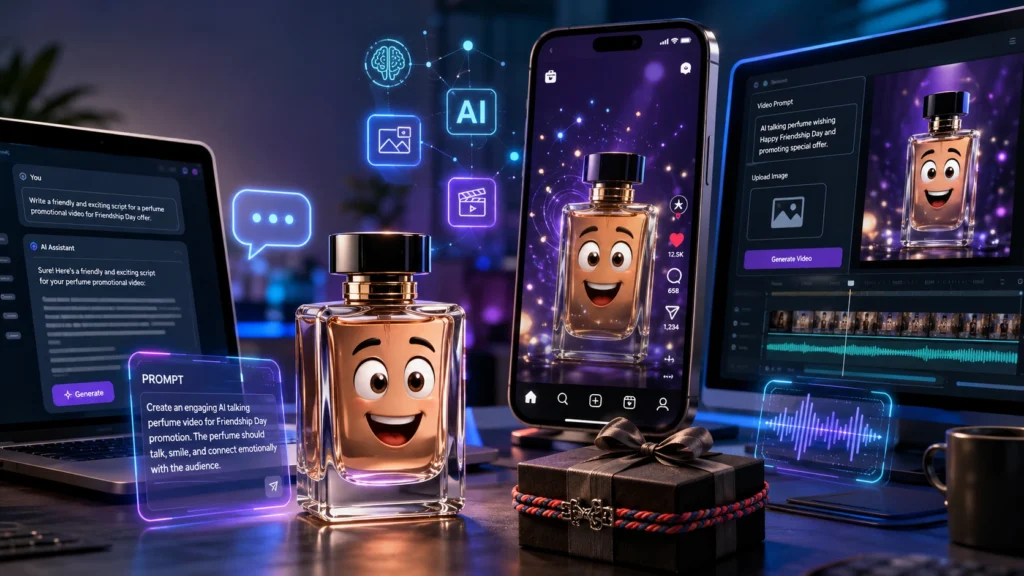
If you’re a small business owner, content creator, digital marketer, or social media manager, you’ve probably wondered how to create engaging Instagram Reels without spending hours recording videos.
The answer is simple: AI Talking Objects Video.
Imagine a perfume bottle talking directly to your customers in Hindi, asking them to gift it to their best friend on Friendship Day. Or imagine a cricket bat, burger, T-shirt, or car speaking with emotions and promoting your latest offer.
Sounds interesting?
In this tutorial, I’ll show you exactly how to create an AI Talking Objects Video using ChatGPT and Google Flow in less than 30 minutes.
Example Business Promotion
Let’s assume Rahul Men’s Wear is running the following offer:
Friendship Day 2026 Offer
Buy 1 Perfume and Get 1 Perfume FREE for just Rs. 499/-
Step 1: Open ChatGPT
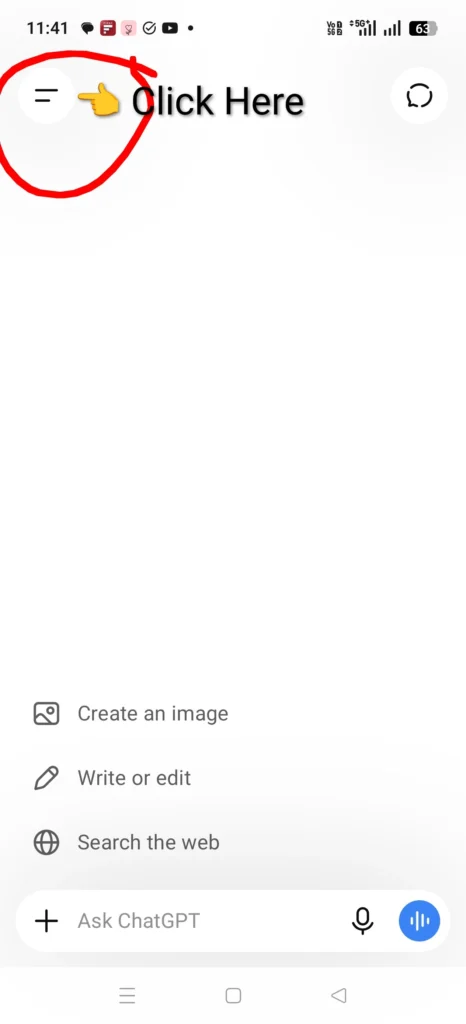
Open ChatGPT on your laptop or mobile. Click on the two horizontal lines located at the top-left corner
Step 2: Open Plugins
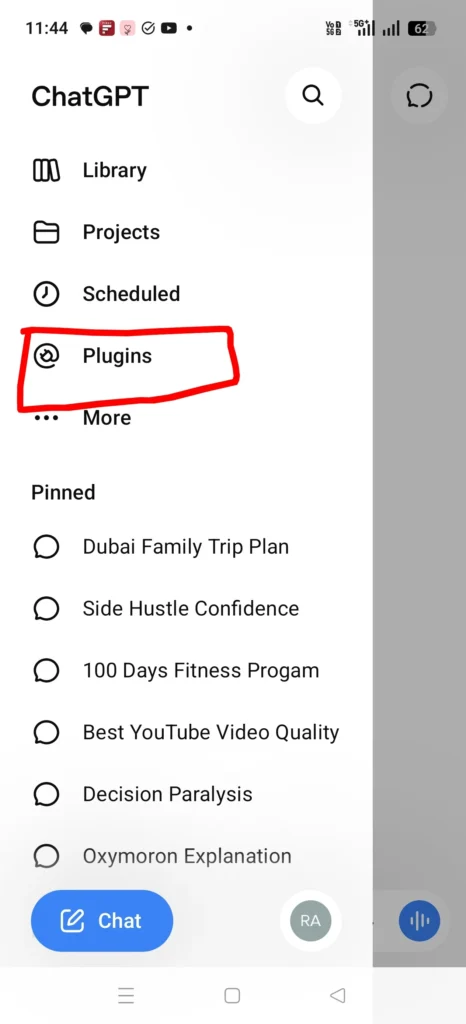
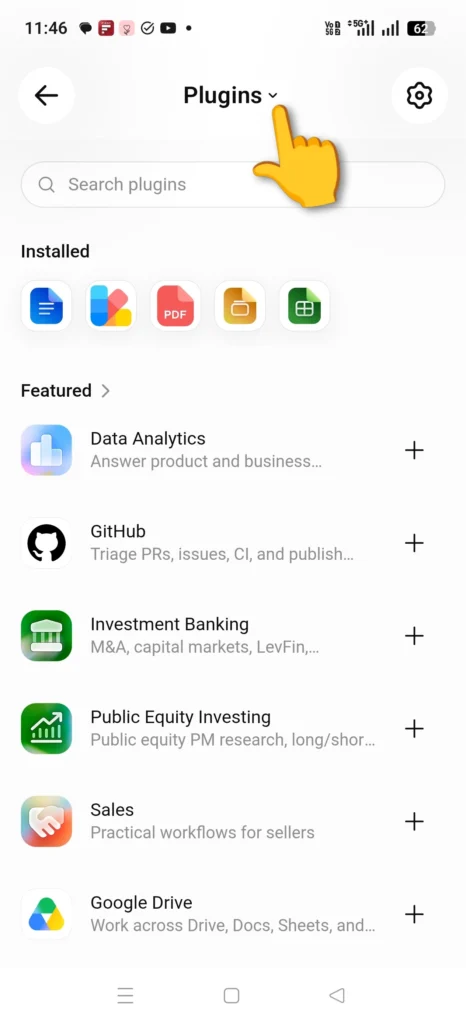
Click on the Plugins option (image 1 below). Click on the dropdown next to Plugins (image 2 below) and select GPTs. If you are using laptop, click on “More” located as the last option on the options pane in the left.
Step 3: Search for the GPT
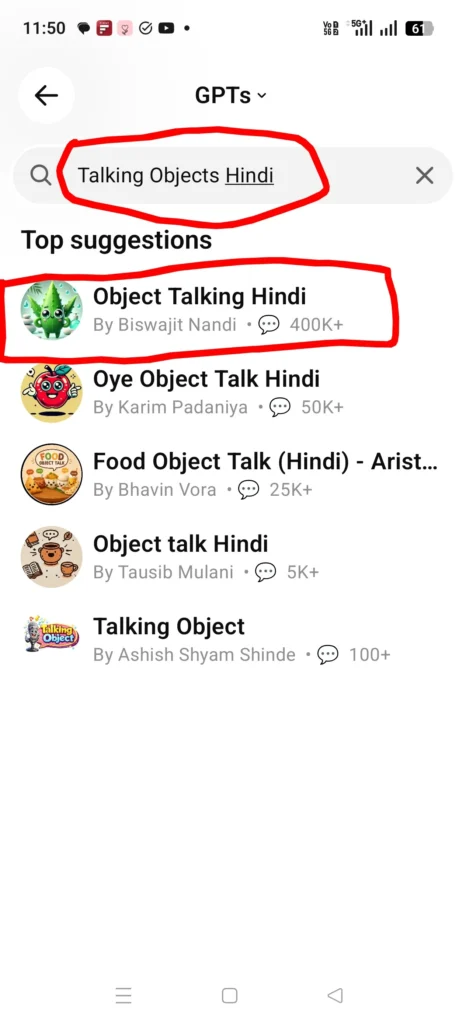
In the search bar, type: “Talking Objects Hindi“. Select the first GPT named: “Object Talking Hindi by Biswajit Nandi“. Click on Start Chat.
Step 4: Enter Your Product
Now type the object you want to promote. For this example, type: “Perfume” and press “Enter”. The GPT will generate 4 different promotional prompts.
Step 5: Modify the Prompt for Your Business
Now give the following instruction:
Modify the prompts to promote a business “Rahul Men’s Wear”. Promote Friendship Day 2026 Offer to Buy 1 Get 1 Perfume free for just Rs. 499/-.
The GPT will now generate 4 customized promotional prompts specifically for your business.
Step 6: Copy Prompt 1
Copy Prompt 1. We’ll use this for generating the image.
Step 7: Open Google Flow
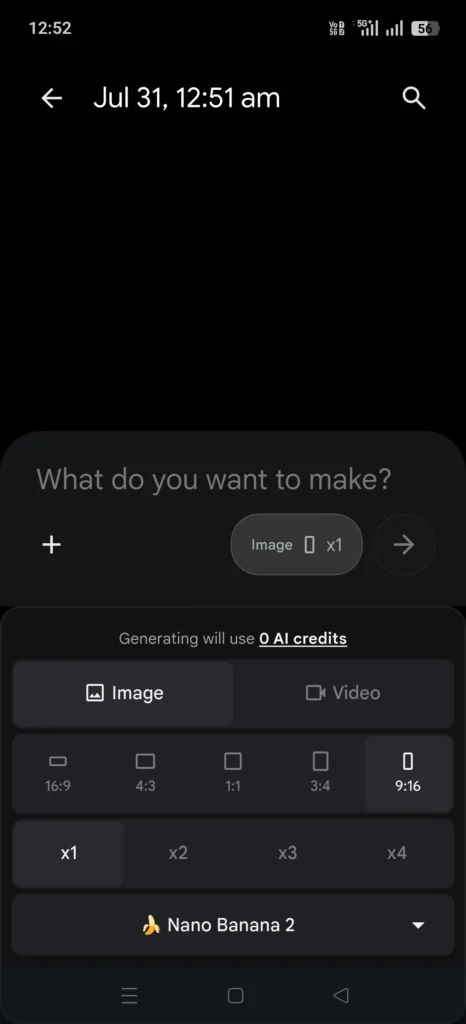
Go to Google Flow if you are using a laptop or a computer. If you are using your phone, download Flow AI App and open it. Click on New Project. Apply the image generation settings exactly as shown in the screenshots.
Step 8: Generate the Image
Paste Prompt 1 into Google Flow. Click Generate. Don’t worry if the image isn’t perfect. Simply click Regenerate. The best part is that generating the image does not consume any credits, so you can keep trying until you’re satisfied.
Step 9: Convert the Image into a Video
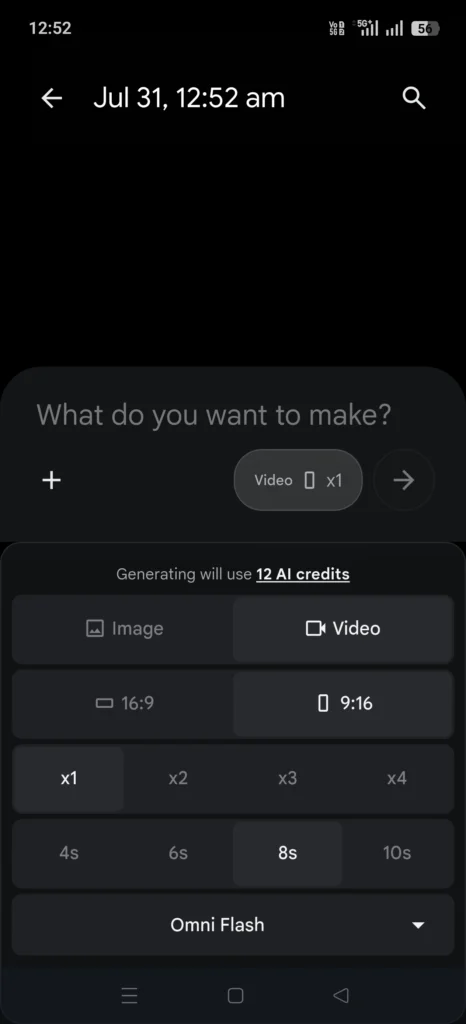
Once you’re happy with the generated image, click the Plus (+) icon and upload/add the generated image into the next prompt. Update the video generation settings exactly as shown in the screenshots below.
Step 10: Prepare the Video Prompt
Go back to ChatGPT. Copy Prompt 1 again that was used to generate the image. Paste it into Google Flow. Now return to ChatGPT. Copy Part 1 of Prompt 2, which is the Hook. Paste it below Prompt 1 inside Google Flow. Now paste your Negative Prompt below that.
Negative Prompt: “Generate the video with spoken dialogue only in Hindi (Devanagari pronunciation), preserving the script exactly as written. Do not translate, paraphrase, or change the language. Keep the lip sync accurate to the Hindi dialogue.”
Your final Google Flow prompt should contain:
- Prompt 1
- Hook Dialogue (Part 1 of Prompt 2)
- Negative Prompt
For example,
“Create a highly detailed vertical 9:16 Pixar-style 3D animated advertisement featuring two expressive luxury perfume bottles with human-like eyes, smiling faces, stylish arms, and glossy glass bodies filled with golden fragrance. The perfume bottles are best friends, happily talking to the camera and celebrating Friendship Day. They are standing in front of a premium men’s fashion store with elegant signage reading “Rahul Men’s Wear”. Decorate the scene with Friendship Day balloons, friendship bands, confetti, gift boxes, colorful ribbons, and a festive shopping atmosphere. Use vibrant premium colors, cinematic lighting, glossy reflections, floating fragrance sparkles, ultra-detailed textures, luxury retail ambiance, modern aesthetic, and dynamic poses. Add bold premium typography with the text: “🎉 Friendship Day 2026 Special Offer 🎉”, “BUY 1 PERFUME, GET 1 PERFUME FREE”, “JUST ₹499/-“, “Only at Rahul Men’s Wear”, and “Limited Time Offer”. Instagram Reel cover style, ultra-HD, highly engaging commercial advertisement, vertical 9:16 composition.
मैं परफ्यूम हूँ… जब भी तुम्हारा दोस्त मुझे लगाएगा, उसे हर बार तुम्हारी याद आएगी। इस Friendship Day, मुझे गिफ्ट करो… क्योंकि खुशबू सिर्फ महक नहीं, यादें भी छोड़ जाती है।
Generate the video with spoken dialogue only in Hindi (Devanagari pronunciation), preserving the script exactly as written. Do not translate, paraphrase, or change the language. Keep the lip sync accurate to the Hindi dialogue.”
This three-part structure usually produces the best-quality videos.
Step 11: Adjust the Duration
Adjust the video duration according to the dialogue. If the dialogue is longer, slightly increase the duration.
Step 12: Generate the Video
Click Generate. Watch the generated video. If you’re not satisfied, simply regenerate until you get the desired output.
Step 13: Generate Part 2
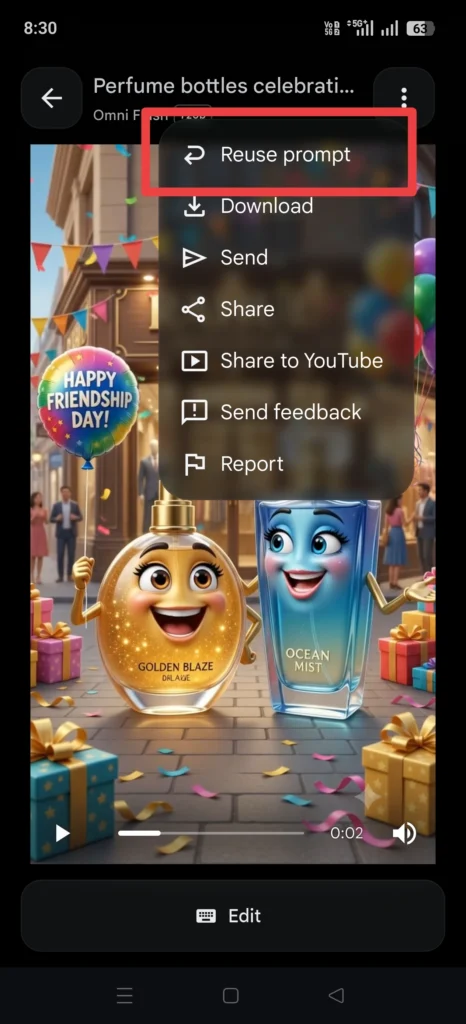
Now click the Reuse option available on video 1 that you just generated in Google Flow. This saves you from writing the entire prompt again. Go back to ChatGPT. Copy Part 2 of Prompt 2, which contains the Offer + CTA. Replace only the dialogue portion in Google Flow. Everything else remains exactly the same.
Click Generate again.
If required, regenerate until you’re happy with the results.
Step 15: Combine Both Videos
Download both the videos and use any video editing app like VN Video Editor to combine both parts. You now have a professional AI-generated promotional Instagram Reel.
Use It for Your Own Business or Sell It as a Service
If you own a business, upload one AI Talking Objects Video daily on Instagram, Facebook, or YouTube Shorts to consistently engage your audience and promote your latest offers.
If you’re a freelancer, digital marketer, or content creator, you can offer this as a service to nearby businesses such as clothing stores, restaurants, etc.
Laptop and Mobile Process is the Same
Whether you’re using a laptop or a mobile phone, the workflow remains exactly the same.
Final Thoughts
Creating an AI Talking Objects Video is one of the easiest ways to produce engaging promotional content without expensive equipment or professional video editing skills.
With just ChatGPT, Google Flow, and a simple video editor, you can transform everyday products into entertaining brand ambassadors that capture attention and drive engagement on Instagram.
Want more ideas like this, click here.