
Learn how to create Cute Baby Animal Videos using AI. Follow this simple guide to make adorable, viral AI animal videos for Instagram Reels and social media.
How to Create Cute Baby Animal Videos Using AI
Step 1: Download Google Flow AI
Download the Google Flow AI app from the Google Play Store and install it on your smartphone.
Step 2: Open the App and Create a New Project
Open Google Flow AI and click on New Project to start creating your AI-generated baby animal video.
Step 3: Set the Video Settings
Configure the video settings as shown below (set the duration to 10 seconds) before generating your video.
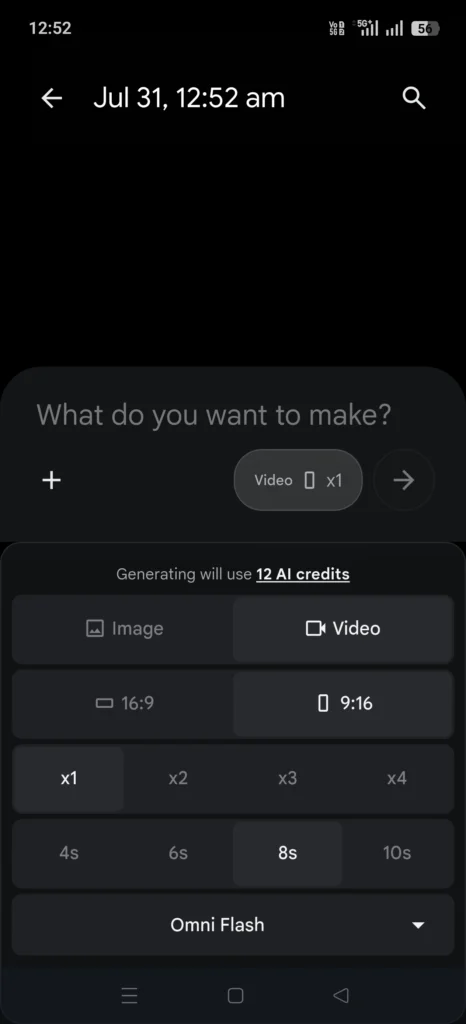
These settings are ideal for creating vertical videos for Instagram Reels.
Step 4: Copy and Paste the Prompt
Copy the AI prompt provided below and paste it into the prompt box in Flow AI. You can replace [ANIMAL] with your preferred animal, such as a puppy, kitten, baby panda, bunny, or any other cute baby animal.
Create a 10-second photorealistic cinematic video in vertical 9:16 format, featuring an irresistibly adorable baby [ANIMAL] against a warm, minimal studio-style background.
0–2 seconds: The baby [ANIMAL] gradually peeks into view from outside the frame, then notices and becomes aware of the camera.
2–4 seconds: It gently moves fully into the shot, makes direct eye contact with the camera, and gives an endearing, curious tilt of its head.
4–6 seconds: Show a centered close-up of the baby [ANIMAL]. It continues looking toward the camera, blinking naturally with an irresistibly cute expression.
6–8 seconds: The baby [ANIMAL] makes a playful, affectionate gesture resembling a cute flying kiss directed toward the camera.
8–9 seconds: After a brief pause, it harmlessly becomes slightly unbalanced and softly tumbles backward, ending up on its back.
9–10 seconds: While lying on its back, the baby [ANIMAL] appears to laugh or giggle joyfully like a delighted baby, showing a happy open-mouth expression accompanied by tiny, playful body movements.
Maintain perfect visual continuity throughout the entire video: the same Animal, facial features, markings, body proportions, and studio environment must remain consistent from beginning to end. Use realistic anatomy, authentic fur detail, believable physics, natural lighting, lifelike movement, and cinematic depth of field.
Avoid: CGI or animated appearance, cartoon styling, humanoid anatomy or posture, clothing, additional Animals, morphing, facial or body deformation, unnatural motion, text, logos, or watermarks.
Step 5: Click Generate
Once you have entered the prompt and selected the required settings, click Generate.
AI will process your prompt and create a cute baby animal video. In just a few minutes, your adorable AI-generated video will be ready to download, share, and post on Instagram Reels.
Create Viral Cute Baby Animal Videos with AI
You can experiment with different animals, expressions, actions, and backgrounds to create multiple variations of Cute Baby Animal Videos. Try different prompts and select the most adorable result before posting it on Instagram.
These AI-generated videos can be an easy and creative way to produce engaging Instagram Reels and capture the attention of viewers.
Tips to Make Your Cute Baby Animal Videos More Viral
Creating the video is only the first step. To increase the chances of your Cute Baby Animal Videos getting more views on Instagram, make sure the final result is engaging from the very beginning. Choose an adorable animal that can quickly capture viewers’ attention, such as a puppy, kitten, bunny, panda, or baby monkey.
You can also experiment with different cute expressions and actions. For example, try prompts where the baby animal looks directly at the camera, tilts its head, makes a funny expression, falls gently backward, or reacts in a playful and adorable way.
Click Here for more such posts.